Replace the free-text box: the intake card and its guard
This is the first of eight rounds on the second build I showed at the Summit this October: a Copilot Studio agent called MerchantScout that helps a seller prepare for a call with a merchant. A card asks the questions, Power Fx turns the answers into the prompt, the model writes a five-section brief, and every number on the card comes from a table rather than from the model. Fictional company again (Fabrikam Payments), one sandbox, Teams web as the stage.
The series runs on Thursdays, alongside the email-to-case rounds on Mondays. Same shape every time: why, how, what I measured, where it bit me, what to download. This round is the front door itself: the card, the node that shows it, and the guard that decides whether a submission is real.
Why: a text box is a promise you can’t keep
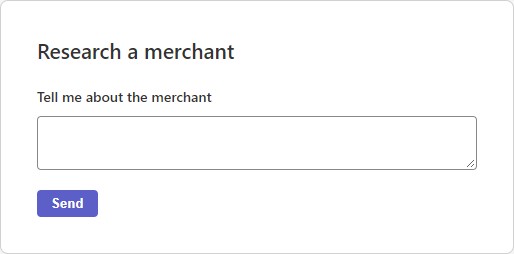
Every agent starts with a question, and most of them ask it in a free-text box. “Tell me about the merchant.” Then the model has to guess what a merchant type is, whether “Pacific Northwest” is a region or a company name, and what to do when someone types “Northwind, coffee, call Tuesday”. I built that version first, as a card with one multiline field, and kept it as the “before” picture. It’s honest about what it is: a prompt with a border.
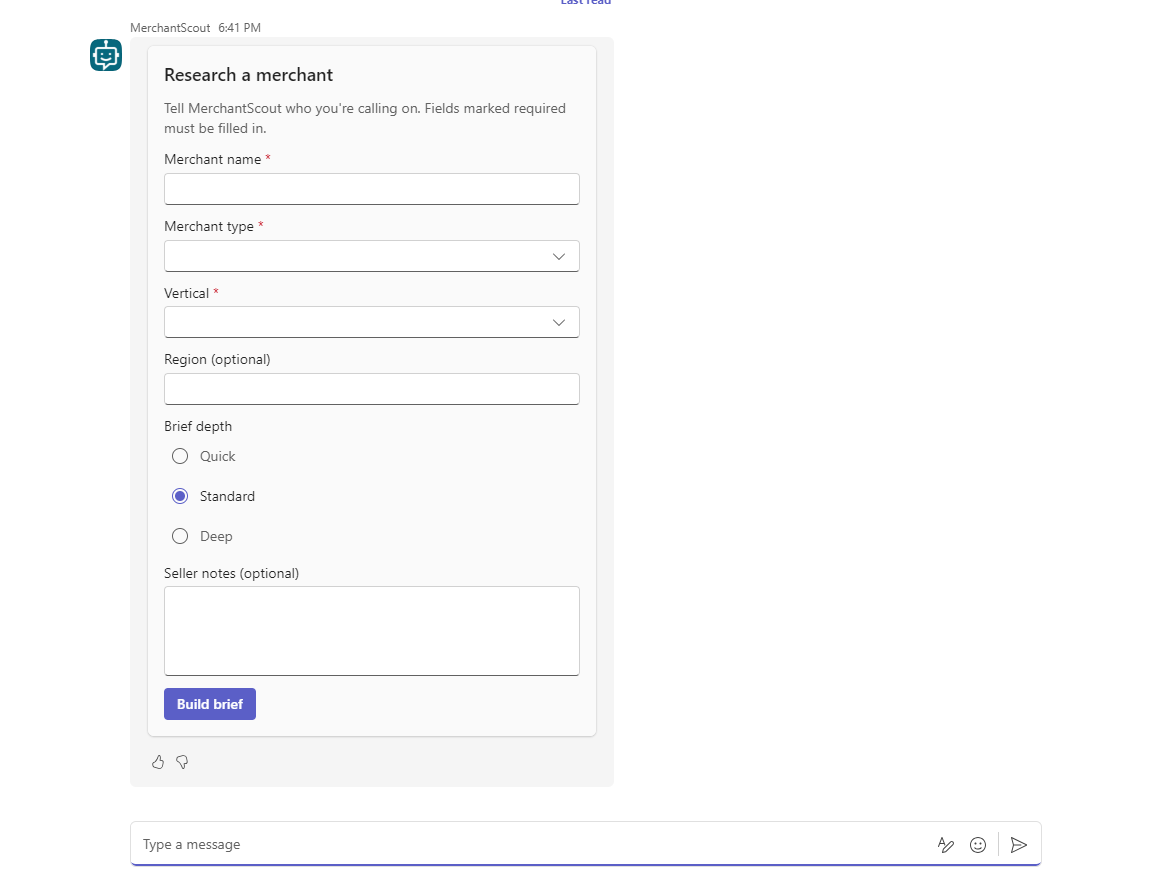
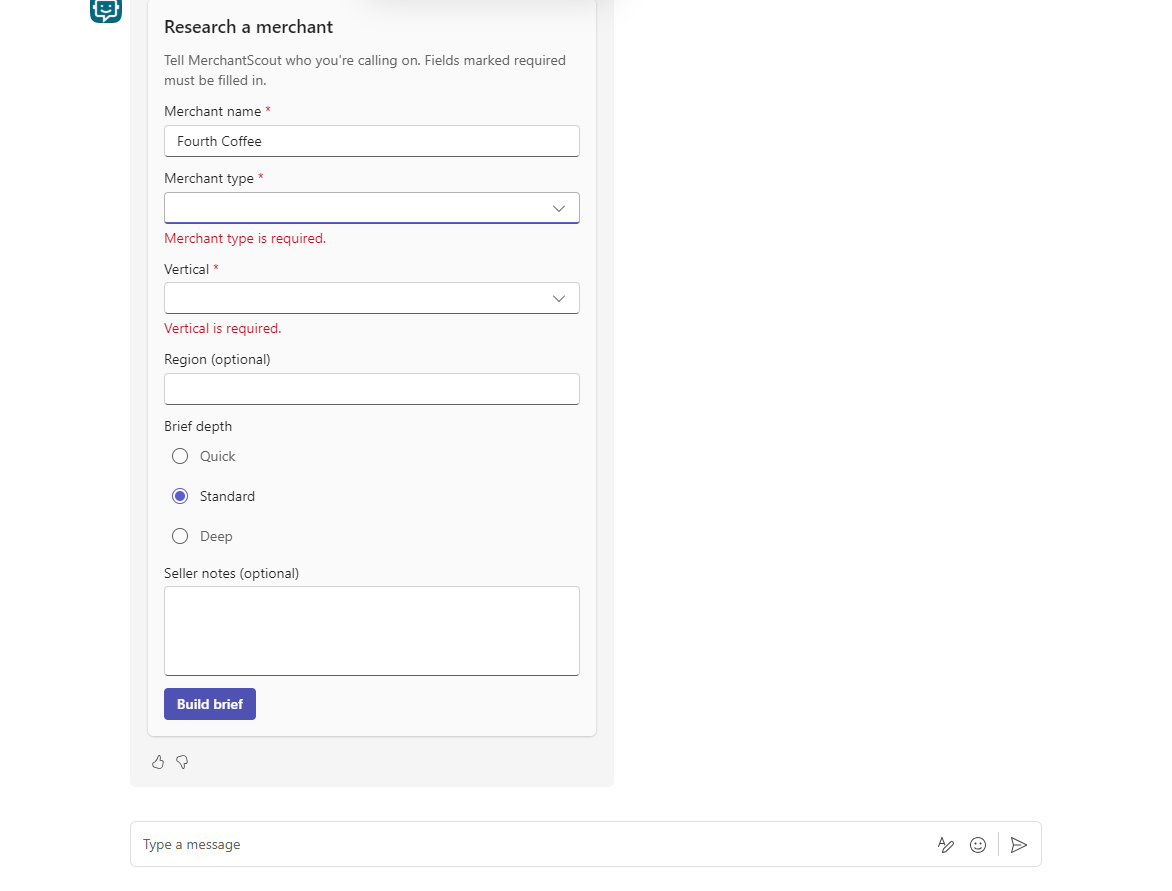
A card changes the deal. An Adaptive Card is a small JSON document that the host app, in our case Teams, renders as a form: labels, dropdowns, radio buttons, one submit button. Each input has an id, so when the seller presses the button the agent receives seven named values instead of a sentence. Three of them can be marked required, and the card itself shows “Merchant type is required.” before anything is sent. The model never sees a half-finished request. And because the fields are typed, the prompt that follows can be assembled with Power Fx rather than written by hand, which is round 2.
There’s a second reason, less visible. The validation is client-side. Microsoft’s own page says so: inputs are checked when the user clicks the submit button, by the renderer, in the app (Adaptive Cards input validation). But anything that reaches your topic without going through that renderer arrives with blank fields and no error: a stale card from earlier in the chat, a host that doesn’t validate, a payload someone crafted. So the card needs a guard behind it, in the topic, that checks the same things again and knows which card the answer came from. Most of this round is about that guard and what we learned by attacking it.
How: the card, the node, the guard
1 · The card: three required, three optional, schema 1.5
Microsoft’s docs: Use Adaptive Cards in Copilot Studio (which schema version each host supports) and the Adaptive Cards input validation page for isRequired, errorMessage and label.
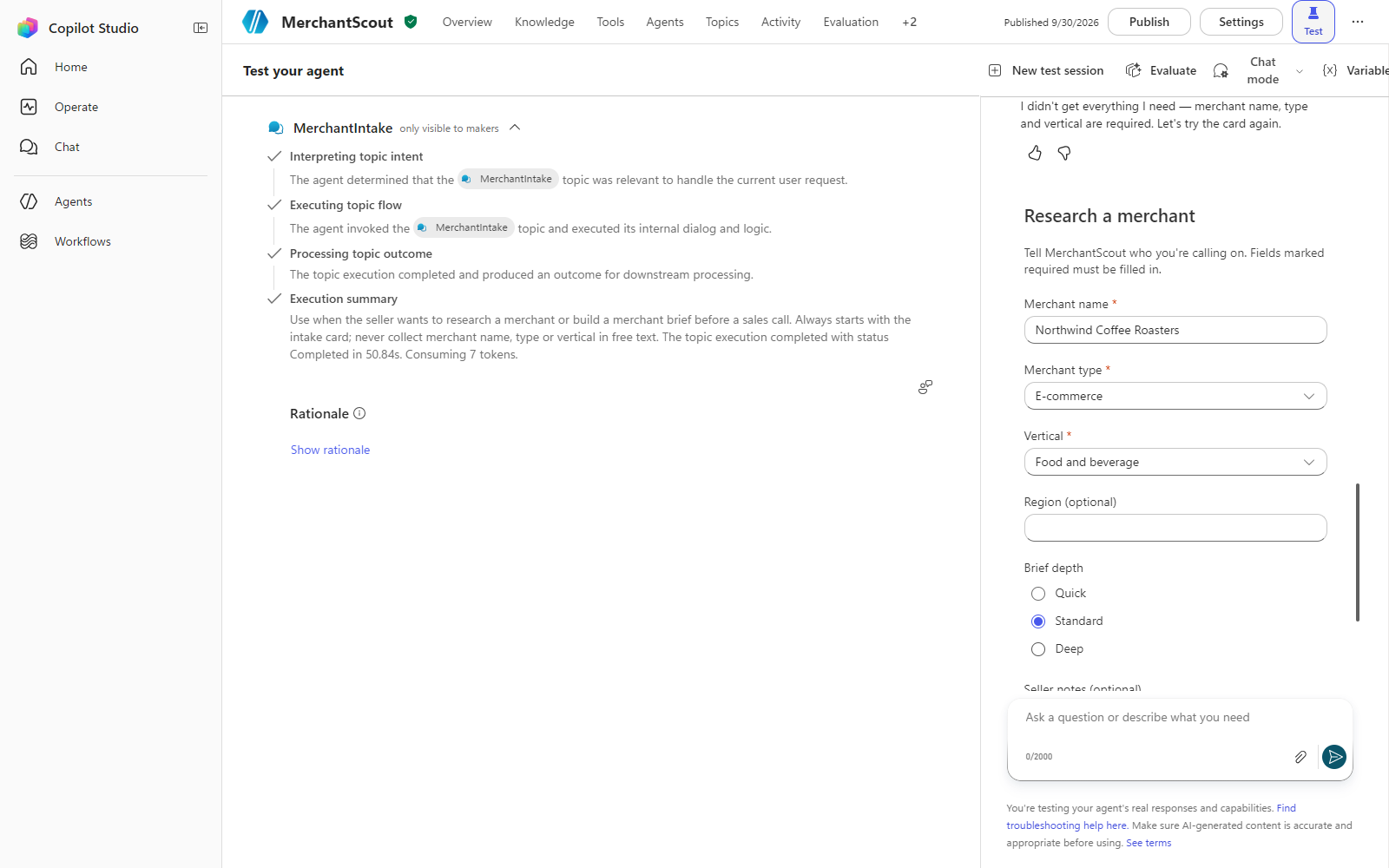
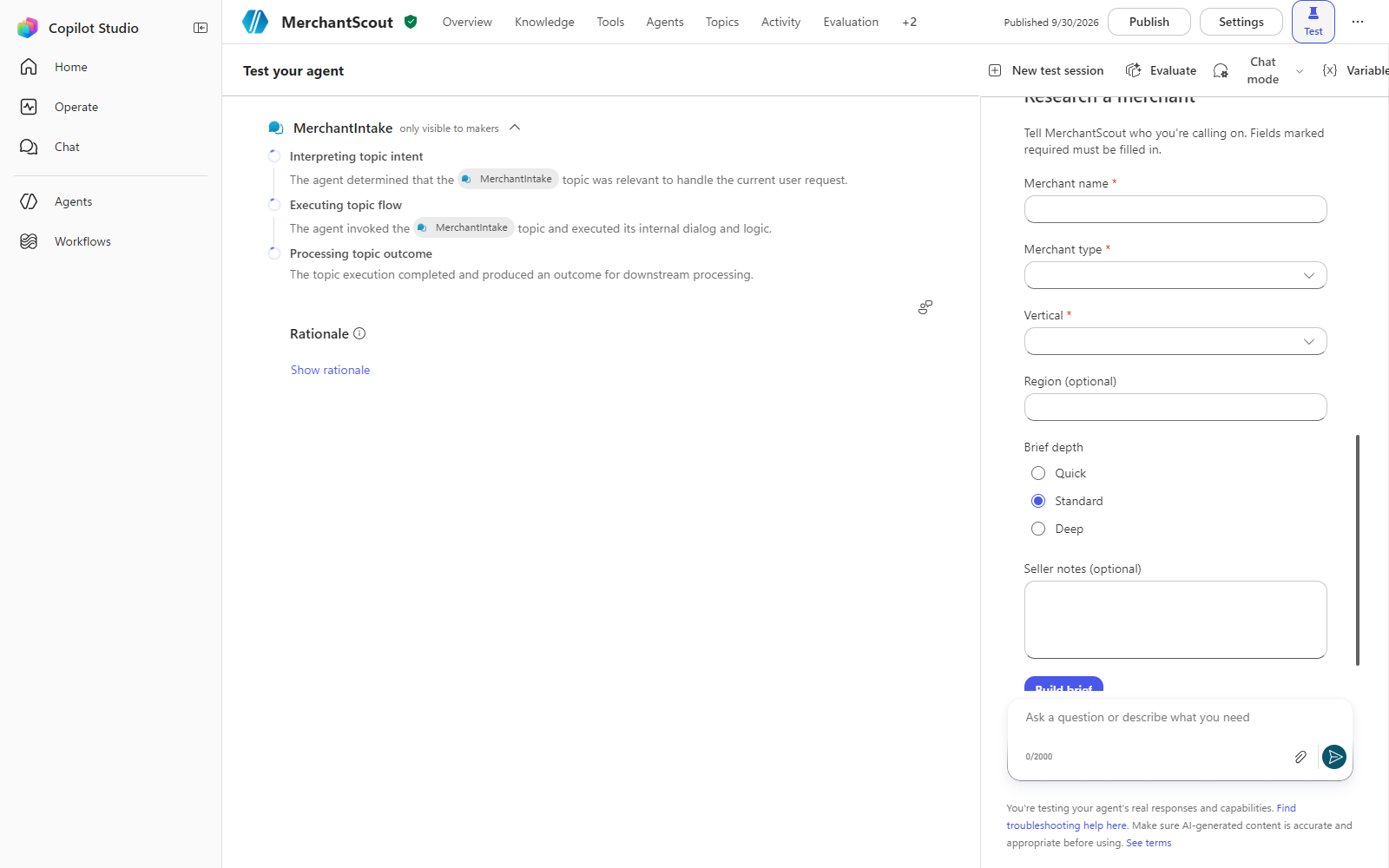
- Write the card as JSON, version 1.5. Ours has a heading, one line of help, and six inputs: Merchant name (text, required, 120 characters), Merchant type (compact choice set, required, five values), Vertical (compact choice set, required, seven values), Region (text, optional, 60), Brief depth (expanded choice set, default “standard”), Seller notes (multiline text, optional, 500). One action: Build brief, an
Action.SubmitwhosedatacarriesactionSubmitId: "merchant_intake_v1". - Use
labelon every input, notplaceholder. Required inputs get a red asterisk from the host, screen readers get a real label, and the help text doesn’t vanish when the user starts typing. The validation page explains why. - Keep the choice values free of commas. The host hands the agent one string per choice set, and a comma inside a value is a bug you’ll meet in round 2 when the values go into a prompt.
- Check the JSON against the schema before it goes anywhere. I ran every card through a validator at build time; the one I’d written on purpose with a 1.6-only element failed at 1.5, which was the point. The whole card is in the download at the end.
2 · The node: Ask with Adaptive Card, two reprompts
Microsoft’s docs: Ask questions with Adaptive Cards.
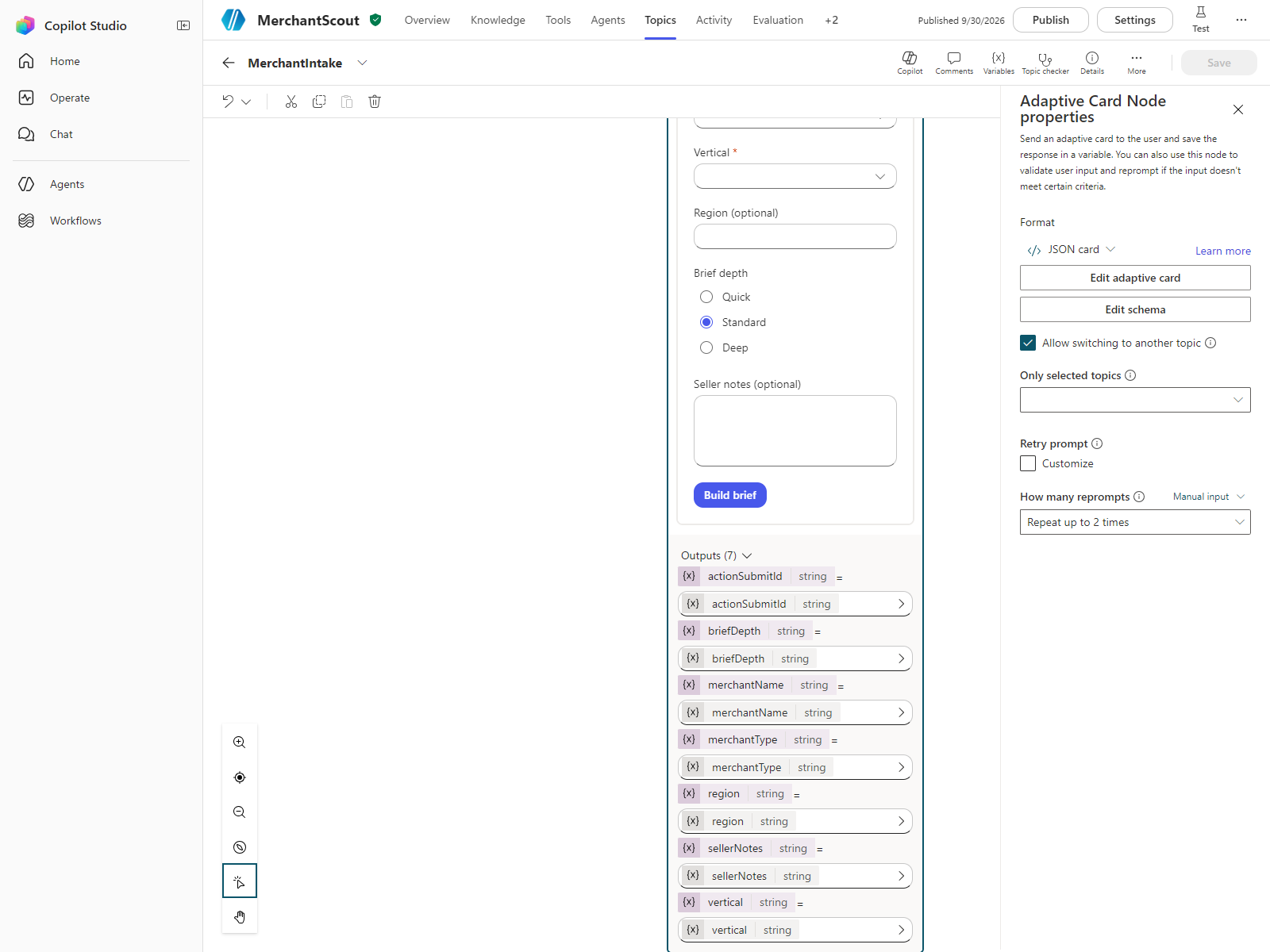
- In the topic, after the trigger, add Ask with Adaptive Card and paste the JSON into its card editor. The node creates one output variable per input id:
Topic.merchantName,Topic.merchantType,Topic.vertical,Topic.region,Topic.briefDepth,Topic.sellerNotesandTopic.actionSubmitId. That last one comes from the button’sdata, and it’s the key to the guard. - Leave How many reprompts at Repeat up to 2 times and Allow switching to another topic on. If the user types text while the card is waiting, the node treats it as invalid and re-sends the card, unless the text triggers another topic. Those are the node’s own rules, and they run before your topic sees anything.
3 · The guard: blanks, and the wrong card
- Right after the card node, a Condition with one Power Fx test:
IsBlank(Topic.merchantName) || IsBlank(Topic.merchantType) || IsBlank(Topic.vertical) || Topic.actionSubmitId <> "merchant_intake_v1"Blank required fields, or a submit that didn’t come from this card. The fourth clause is the one people skip, and it’s the one that caught the nastiest case below.
8. If true: add one to Topic.attempts. If attempts is 2 or less, send “I didn’t get everything I need — merchant name, type and vertical are required. Let’s try the card again.” and Go to step back to the card node. Otherwise send “Let’s start again when you have the details — type research a merchant whenever you’re ready.” and End current topic. Two re-prompts, then a clean exit, never a dead end.
9. If false: continue. The confirmation message reads the variables back (“Got it — researching Northwind Coffee Roasters (E-commerce, Food and beverage) as a standard brief”), so the seller sees what the agent understood before the model runs. Then the prompt, the brief and the card that shows it: rounds 2 and 3.
What we measured
The submit matrix. On 30 September I ran seven submissions through the test canvas, each in a fresh session. The harness filled the card with valid values and then rewrote the submit request in flight, so the topic received the payload I chose rather than the one the card would have sent. That’s the only way to send what a validating host would never let through.
| Payload | What the topic received | What happened |
|---|---|---|
| Complete | all seven values | confirmation, then the brief card |
| Missing type | merchantType = "" | guard message, card re-sent |
| Empty | {} | no message at all; the card was re-sent silently (reproduced twice) |
| Stale card v0 | the free-text card’s payload, old id | guard message, card re-sent |
| Stale id only | all fields valid, actionSubmitId = the old card’s | guard message, card re-sent |
| Long notes | sellerNotes of 1,200 characters | accepted; confirmation and brief |
| Three bad submits | vertical blank, three times | guard message twice, then the exit message, topic ended |
Three rows matter. The empty payload never reached my guard: the card node’s own reprompt handled it, and the user saw the card again with no explanation. The stale id with valid-looking fields did reach the guard, and only the fourth clause stopped it; a guard that checks blanks alone would have built a brief from an old card. And the 1,200-character notes went straight through, because maxLength is enforced by the card in the browser and nowhere else.
Card latency. I’d set myself a target: a card on screen within 3 seconds of the trigger phrase. Here’s what the stopwatch said, from the message going out to the card appearing on the page:
| Host | Runs | Median | Range |
|---|---|---|---|
| Test canvas, fresh session each time | 5 | 4.8 s | 4.3 to 5.8 s |
| Teams web, warmed-up client | 6 | 5.4 s | 4.2 to 8.4 s |
Not met, in either host. Later in the project we found a bigger effect that sits in front of these numbers: the first reply of a freshly opened Teams web client took 49 to 79 seconds, for any topic, even one with no model step. In a client that had already answered once, cards arrived in 3 to 15 seconds. Round 7 has that story and what I now do before a demo.
The schema question. As of today the two Microsoft pages disagree. The Copilot Studio page (captured 26 October 2026) says Teams is limited to version 1.5. The Teams platform page (captured 26 October 2026) says Teams supports 1.6 or earlier. I wrote a 1.6 card on purpose and sent it: it rendered in Teams web, and the 1.6-only input turned into a people picker. I’d still ship 1.5 to Teams, and I’d read both pages again before I promised anyone a 1.6 feature.
Where it bit us
The card that re-sends itself without a word. The empty-payload result is the one I’d want you to remember. If a submission arrives with nothing in it, the node silently shows the card again. No guard message, no log line from your topic, nothing to search for later. In the demo I’d have read that as “the card didn’t work” and reloaded Teams. If you need to know it happened, the node’s retry prompt is where you say so: customise it, even with one line.
The host enforces the length, not the platform. I’d written maxLength: 500 on the notes field and assumed it meant 500. It means the browser stops you at 500. The topic accepted 1,200. The fix is one function in the prompt formula, Left(Topic.sellerNotes, 500), and the rule behind it: every limit you care about gets checked server-side, in Power Fx, after the card.
The id check is the guard. The blank test is what everyone writes. The actionSubmitId test is what stopped a payload with a valid merchant name, type and vertical that came from a card the topic hadn’t sent. The Copilot Studio page now has a section on exactly this, under consecutive cards; it recommends an identifier in each submit’s data and a check when the response is processed. Give every card its own id, and compare, don’t just read.
Three seconds was the wrong promise. I wrote the target before I’d measured anything, because it sounded right. Five seconds is what the platform gave me in both hosts, and the first minute of a cold Teams client is a different problem altogether. The lesson isn’t the number; it’s that the target went into the design document before the first run, and then I had to report against it. Measure first, promise second.
What to download
The card and the guard, as built: intake-card-v1.json (schema 1.5, six inputs, one submit with its id) and guard.fx (the condition, with the id filled in). Paste the JSON into an Ask with Adaptive Card node, the formula into the condition after it. Fictional data, sandbox only. The full pack from the session is on the downloads page once this series reaches it; until then, the Summit attendee pack has the same files.
Try it this week
Open the first topic of an agent you’ve built and look at its first question. If it’s a Question node with free text, you already know what the model is guessing. Replace it with a card: three required fields, labels not placeholders, an id in the submit data. Then do the one test I wouldn’t have thought of: send the card’s old payload from a second chat window after you’ve changed the card, and see what your topic does with it. If it builds something, you’ve found your guard.
Next round, Thursday: the prompt is a formula. How seven typed variables become the whole prompt in Power Fx, why the length rule goes at the end, and what happened to “quick” briefs when it didn’t.

Lorenc Koka, MD · Senior Delivery Director - Solutions Architecture, D365 CE · Argano
I build governed AI and automation on Dynamics 365 and the Power Platform for enterprise clients, and write down what I learn doing it.
 5× FastTrack Recognized Solution Architect Dynamics 365 Customer Engagement · 2022 – 2026